


 Bodno A10From $995
 Bodno A20From $1,595
 Bodno A30From $1,995
 Bodno A40 ProFrom $2,995
 vs.
vs.



 CR80 30 mil PVC cardsFrom $3.99
 Adhesive-backed PVC cardsFrom $9.99
 Proximity cards (NoMativ)From $369.00
 NTAG NFC cards, 100 packFrom $59.00
 Buy the softwareDesign and print ID cards on PC and Mac




On this page
Updated October 12, 2026
Install the driver for your exact Seaory model and operating system so your computer can communicate with the printer. This guide covers S25, S26 and S28 on Windows and Mac. Printer-driver installation is separate from installing or activating Bodno card-design software.
Download the correct driver
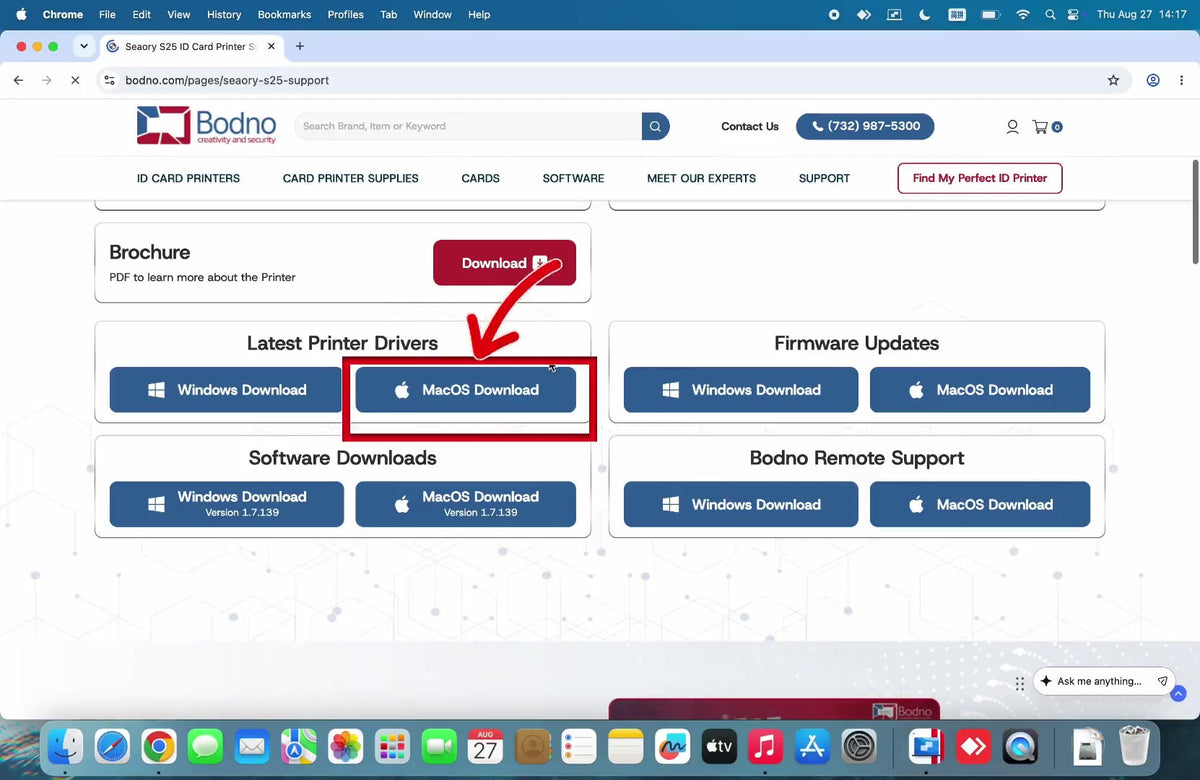
Open S25 support, S26 support or S28 support, then choose the Windows or Mac driver. Save the file somewhere you can find it, such as Downloads.
Before you install
- Pause your antivirus. Some antivirus programs block printer driver installs. Turn it back on when the install finishes.
- Leave the printer off until the driver install has finished.
On Windows
- Open the downloaded driver package. Extract it first if it is an archive.
- Run the Seaory setup program and follow its installation prompts. If Windows asks whether to trust software from Shenzhen Seaory Technology, choose to always trust it and click Install.
- Finish the wizard, then connect and turn on the printer, and check that your Seaory printer appears in Windows Printers & scanners.
On Mac
- Open the downloaded driver package and launch its installer.
- Follow the installer through completion. If macOS blocks it, go to System Settings › Privacy & Security and click Open Anyway.
- Check Printers & Scanners for your printer. If adding an S26 or S28 over Ethernet, follow the network setup guide.
- S28 printing only the front of the card on a Mac? Turn on Print Back once: dual-sided printing on a Mac.
Update the firmware
Once the driver is installed and the printer is connected, update the printer's firmware before you print real cards. Do this on every new printer: it ships with whatever firmware was current when it was built. Follow the firmware update guide for Windows or Mac.
Check your first print
The S25 connects by USB; S26/S28 support USB or Ethernet. Install the correct ribbon, load a card for your model, then print a driver test card. If the printer is missing or installation fails, send support your model, operating system and installer message.
If the computer cannot find the printer
- Plug straight into the computer with the USB cable that came with the printer. Skip hubs, extension cables and docking stations. On a desktop, use a USB port on the back.
- Restart the print service. Restarting the computer does this; on Windows you can also restart the Print Spooler service.
- Reinstall a current driver. An old driver can lose contact with the printer. Uninstall it, restart, and install the current one from your model's support page.
- Try another computer. If the printer does not respond on two different computers, contact us; the problem is in the printer, not your PC.
Need help? Email support@bodno.com or call (732) 987-5300 with your printer model and the message you see.
Download it, activate it, or add another license. Activation codes arrive by email in 15 minutes.
