Bodno A10From $995
 Bodno A20From $1,595
 Bodno A30From $1,995
 Bodno A40 ProFrom $2,995
 vs.
vs.



 CR80 30 mil PVC cardsFrom $3.99
 Adhesive-backed PVC cardsFrom $9.99
 Proximity cards (NoMativ)From $369.00
 NTAG NFC cards, 100 packFrom $59.00
 Buy the softwareDesign and print ID cards on PC and Mac





Bodno
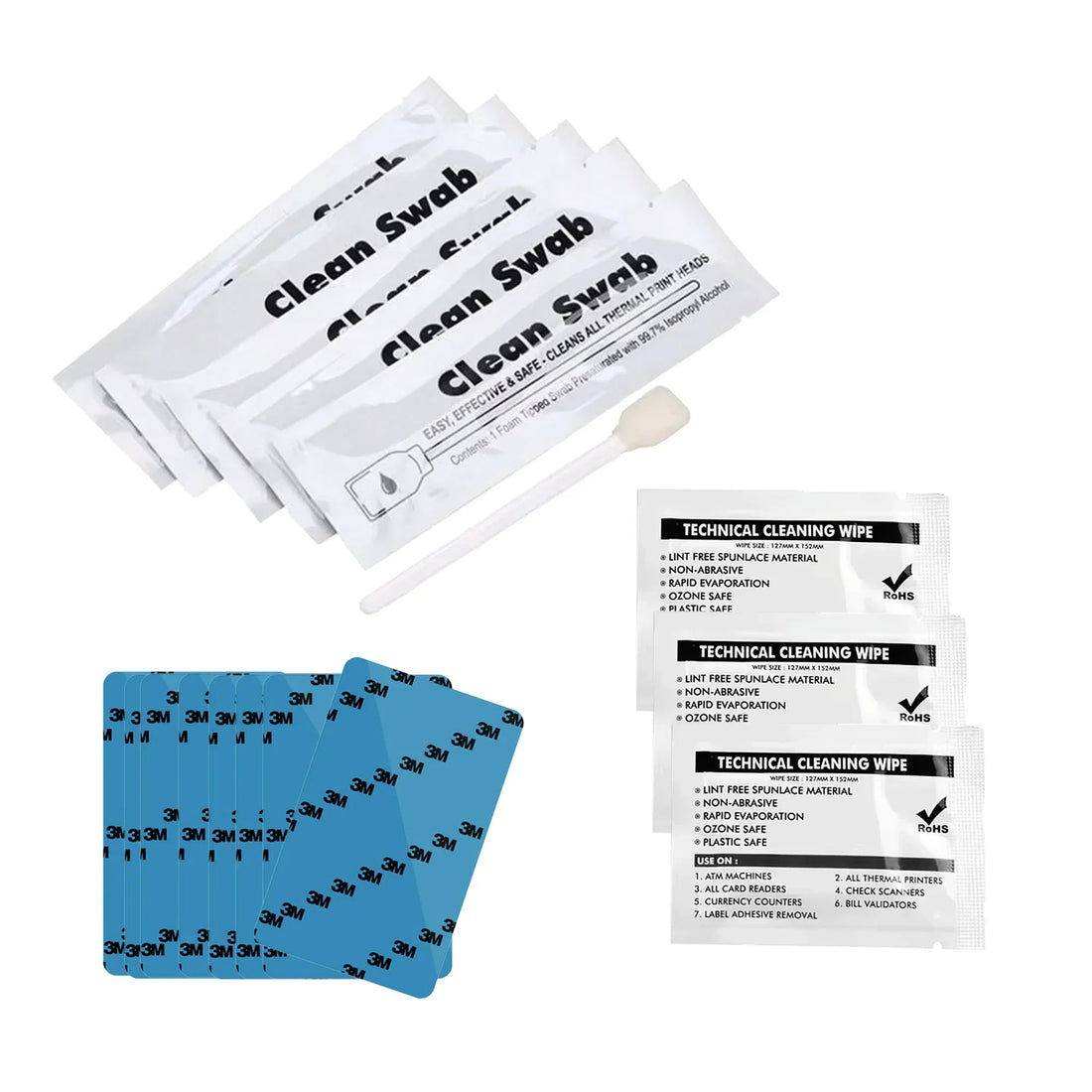
Bodno BB001 Cleaning Kit for A-Series Printers – Cleaning Card, Swab & Cloth
✓ Fits Bodno A10, Bodno A20, Bodno A30, Bodno A40 Pro4 printer models · See compatible printers
Compatible with
Don’t see your printer? Find your printer’s supplies or call (732) 987-5300.


Customers also buy
Specifications
| Brand | Bodno |
|---|---|
| Part number | BB001 |
| Fits | Bodno A10, Bodno A20, Bodno A30, Bodno A40 Pro |
About this product
Keep your Bodno A-Series printer running like new. The Bodno BB001 Cleaning Kit is a simple, cost-effective way to protect print quality and extend the life of your Bodno A10, A20, A30, or A40 Pro card printer.
Why Cleaning Matters: Dust and ribbon residue build up on your printhead and rollers with every card you run, causing streaks, faded output, and premature wear. A quick clean every time you change your ribbon keeps prints sharp and consistent and helps your printer last for years.
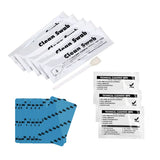
The Kit: The Bodno BB001 (Part #BB001) includes 10 cleaning cards, 5 cleaning swabs, and 3 cleaning cloths — the complete set for a thorough maintenance pass. Each piece targets a different part of the printer, so you can clean the card path, printhead, and exterior in minutes. No technical background required.
Compatibility: Made for the Bodno A10, A20, A30, and A40 Pro card printers.
Made by Bodno.
What's in the Box
- 10 x Bodno Cleaning Card
- 5 x Bodno Cleaning Swab
- 3 x Bodno Cleaning Cloth
Reorder & Related Supplies: Pair with Bodno A5100 or A5300 color ribbons and blank PVC cards to keep your card program fully stocked. Recommended: clean every time you change your ribbon for best results.
Common questions
Which printers does this fit?
It fits the Bodno A10, Bodno A20, Bodno A30, Bodno A40 Pro. Not sure which printer you have? Email sales@bodno.com and we’ll confirm it before you order.
How do I use this kit?
Take the ribbon out first. Run the cleaning card through the printer from the driver (Printing Preferences › Tool › Cleaning Tool). Then turn the printer off, let the printhead cool for a minute and wipe along it with the swab. The card and swab are single use. The cloth can be reused.
How often should I clean the printer?
Whenever you change a color ribbon, and any time prints start to look dull or show specks.
I cleaned the printhead and there is still a thin white line on every card.
Dust can block a strip, so clean first. If the line is still on the test chart after cleaning, the printhead needs replacing. See White line on the card.
What is the part number on each kit?
It’s the printer maker’s own cleaning kit number, such as Magicard 3633-0053 or Zebra 105999-310. Bodno kits are made to replace the kit with that number, so you can match it to the kit you bought before.
Why is compatibility so important?
Each printer has its own cleaning protocol and internal design. Using the wrong kit can lead to ineffective cleaning—or even damage. Bodno’s kits are matched to manufacturer specifications, so you get safe, thorough maintenance every time.
Is this worth it for my team or organization?
Absolutely. A cleaning kit costs a fraction of what a repair or replacement would. For budget-conscious teams, it’s one of the smartest ways to extend your printer’s life and maintain professional-quality ID cards.