


 Bodno A10From $995
 Bodno A20From $1,595
 Bodno A30From $1,995
 Bodno A40 ProFrom $2,995
 vs.
vs.



 CR80 30 mil PVC cardsFrom $3.99
 Adhesive-backed PVC cardsFrom $9.99
 Proximity cards (NoMativ)From $14.99
 NTAG NFC cards, 100 packFrom $59.00
 Buy the softwareDesign and print ID cards on PC and Mac




On this page
Updated
The ribbon LED is the sensor that reads the color panels as the ribbon moves. Calibrating it takes about thirty seconds and is the first fix for ribbon error code 48, ribbon errors right after a ribbon change, and colors printing out of sequence.
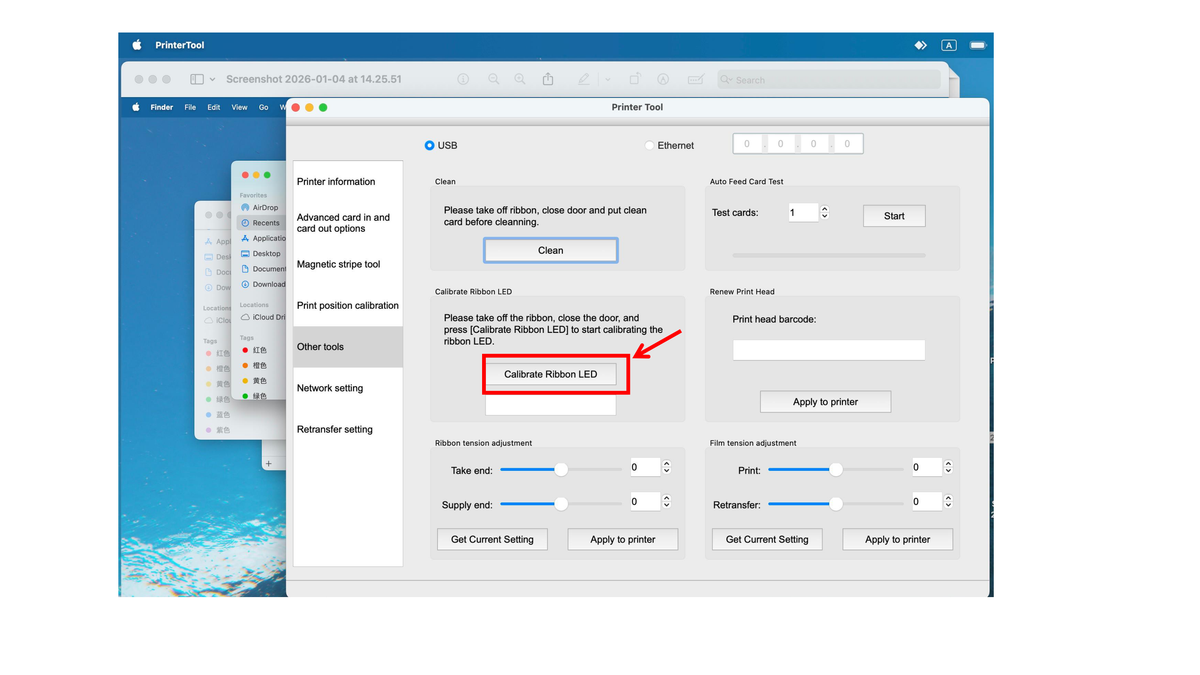
Ribbon out, cover closed. Windows: Printing preferences → Tool → Calibrate Ribbon LED → Calibrate. Mac: Printer Utility → Other tools → Calibrate Ribbon LED. Follow the calibration result shown by your utility, then reinstall the ribbon and test.
The calibration measures the sensor with nothing in front of it. Run it with the ribbon cartridge removed and the cover closed. The driver says the same thing: take off the ribbon, close the door, then press Calibrate Ribbon LED.
On Windows
Follow the result or status shown by your utility. After calibration completes, reinstall the ribbon, close the cover and print a test card. If calibration fails or Error 48 remains, send Bodno support the displayed result.
On Mac
Seaory's own words: different interface, same operation.

After calibration completes, reinstall the ribbon and print a test card. If calibration fails or Error 48 remains, send Bodno support the displayed result.
What the result means
Seaory puts a normal reading at around 195. The 162 in the video came from a working printer, so a slightly lower number is fine as long as calibration completes and the test card prints.
| Result | What to do |
|---|---|
| Completes, reading near 195 | Normal. Reinstall the ribbon and print. |
| Fails, but reads above 50 | The LED or sensor is dirty or slightly out of line. Clean it and check the LED bracket in the Error 48 guide, then calibrate again. |
| Reads 0 | The sensor or its cable has a fault. Contact us; this is not a cleaning job. |
After a ribbon error (code 48 especially). After cleaning the LED and sensor. After reseating the LED bracket. You do not need to do it at every ribbon change.
Supplies for this job
Bodno Tech Support will finish it with you
Send a photo or a 20-second phone video and we can usually tell you the next step the same day. If your printer is covered by TotalCare, mention your order number and we will arrange the rest.
Call (732) 987-5300Email supportOpen a support requestApplies to Seaory S25, S26 and S28 sold by Bodno.
Tell our support team your printer model and what you see on the screen, and we'll help you get printing.
