


 Bodno A10From $995
 Bodno A20From $1,595
 Bodno A30From $1,995
 Bodno A40 ProFrom $2,995
 vs.
vs.



 CR80 30 mil PVC cardsFrom $3.99
 Adhesive-backed PVC cardsFrom $9.99
 Proximity cards (NoMativ)From $14.99
 NTAG NFC cards, 100 packFrom $59.00
 Buy the softwareDesign and print ID cards on PC and Mac




On this page
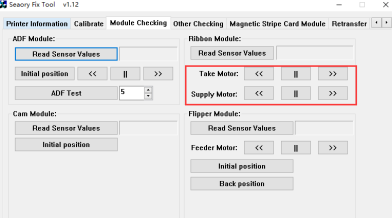
Error 45 means the printer cannot see a ribbon. If you also notice the ribbon winding the wrong way when you close the cover, and breaking, the cause is usually a ribbon motor that is not turning, most often because its cable has worked loose. The Fix Tool lets you test both motors in a minute.
Ribbon out. Fix Tool → Module Checking → jog Take Motor and Supply Motor with << and >>. A spindle that does not turn means that motor's cable needs reseating. Both turn and the error stays: send us a 20-second video of the test.
Thirty-second checks first
- Cartridge seated? Take the ribbon cartridge out and put it back until it sits flat. Close the cover firmly.
- Ribbon routed over the printhead, not under it? A ribbon forced under the head is the classic cause of ribbon errors after a ribbon change.
- Calibrate the ribbon LED with the ribbon out.
Still code 45, or the ribbon visibly winds the wrong way when you close the cover? Then one of the two ribbon motors is not doing its job. Test them.
Test both ribbon motors with the Fix Tool
With no ribbon in the way you can watch the spindles turn.
The Fix Tool is Seaory's service utility. If you do not have it, email support with your order number and we will send it.
Under Ribbon Module: click << and then >> next to Take Motor. Do the same for Supply Motor.

Each spindle should turn in both directions when its motor is jogged.

What you saw decides the next step
A spindle does not turn: reseat that motor's cable
Seaory's engineers see this often. A motor cable that has worked loose makes the ribbon drive misbehave, and reconnecting it brings the printer back. Nothing is replaced.

If the spindle now turns, install the ribbon, calibrate the ribbon LED and print. If it still does not turn, the cable or the motor needs replacing: contact Bodno and we will sort out the part.
Stop here. Take a 20-second phone video of the motor test (the Fix Tool buttons and the spindles) and send it to support. That is exactly what Seaory asked for, and it lets us tell you whether it is the cable, the motor or something else without you taking anything apart.
Both spindles turn, but the ribbon still rewinds backwards or code 45 stays
Then the motors are fine and the fault is upstream. Record a short video of steps 3 and 4, the motors jogging and the spindles turning, and send it to support with your order number and a screenshot of the Fix Tool's Printer Information tab. We pass it straight to Seaory engineering and come back with the next part to check.

Supplies for this job
Bodno Tech Support will finish it with you
Send a photo or a 20-second phone video and we can usually tell you the next step the same day. If your printer is covered by TotalCare, mention your order number and we will arrange the rest.
Call (732) 987-5300Email supportOpen a support requestGuide prepared with Seaory after-sales engineering. Last reviewed August 2026. Applies to Seaory S25, S26, S28 sold by Bodno.
Tell our support team your printer model and what you see on the screen, and we'll help you get printing.
