Bodno A10From $995
 Bodno A20From $1,595
 Bodno A30From $1,995
 Bodno A40 ProFrom $2,995
 vs.
vs.



 CR80 30 mil PVC cardsFrom $3.99
 Adhesive-backed PVC cardsFrom $9.99
 Proximity cards (NoMativ)From $14.99
 NTAG NFC cards, 100 packFrom $59.00
 Buy the softwareDesign and print ID cards on PC and Mac





On this page
There are many different brands, models, and builds of ID card printers available on the market today. This can make the endeavor of purchasing an ID card printer a bit overwhelming for buyers. However, not all ID card printers are made equal, and it is important to carefully evaluate the available options and assess the features and functions of each one before making an adequate choice. Below are some practical tips to help you choose the best ID card printer for your requirements.
Have a Budget in Mind
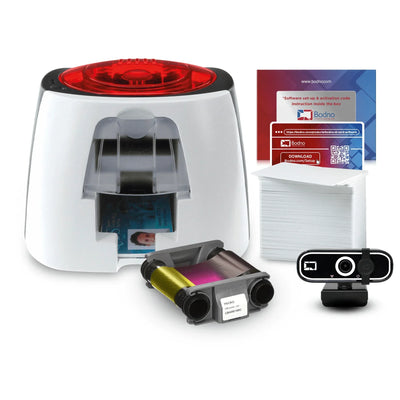
Having a clear budget set in your mind before starting to look at the popular ID card printers in the market will help to narrow down your options. Just sort the available models based on their price and see if those that fall within the range have the features that you want. The lower end price of ID card printers may encompass something like the Evolis Badgy100, a simple single card printer that functions perfectly for small stores and businesses. (Link can be found here: https://bodno.com/products/badgy100-id-card-printer Although the Badgy100 does come with the first party Badge Studio it lacks all of the extra quality of life features that comes with the Bodno software.
In addition to budget you should be well aware of your needs before choosing an ID card printer. You can raise the budget a bit higher if you do not see any models within the price range that could fulfill your specific requirements like double sided printing or RFID capabilities. The Zebra ZC350 is probably the least expensive ID card printer that offers adequate print speed and dual sided printing: https://bodno.com/products/zebra-zc350-id-card-printer While the ZC350 does come with its own first party software called Zebra CardStudio the Bodno ID Software boasts a user-friendly UI and a simple, streamlined design process.
At the same time, you can assess your total needs based on the price as well, and determine if you can sacrifice certain features to keep your total costs down in the long-run. You should also consider spending not more money on any specific features that you may rarely use or stick to the base options available. Similarly, calculate the costs of ribbons, dyes, and blank cards as well when evaluating the price of your preferred ID card model. A yearly use case is ideal for comparing your best option.
Single-Sided or Dual-Sided Printing?
As previously mentioned, you should have a clear understanding of how you’re going to be using your ID card printer well before checking out the available options. One such important aspect to consider is the printing mode. Where single-sided printers support printing on only one side of the ID cards, dual-sided printers can be used to print on both sides of the card. Single-sided ID card printers can serve the purpose of printing on both sides as well, but with some models you may have to print on one side first and then flip the card manually to print on its back. Auto-flippers are considered a bit of luxury.
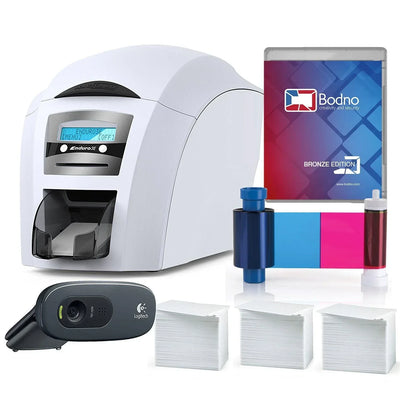
If you need to print information on both sides of the ID card, it would be necessary to go with a high quality double sided ID card printer such as the Magicard Enduro 3e. (Link found here: https://bodno.com/products/magicard-enduro-3e-id-card-printer) This model makes it very simple to print images and text on both sides of the ID cards. However, such ID card printers are always going to be more expensive than those that support printing on only one side. It’s also worth considering that the Magicard Enduro 3e doesn’t come bundled with a software so it’s necessary to have a Bodno ID Card software license or a comparable badge designer in order to enjoy the full capabilities of your printer.
Estimate your Expected Printing Volume
You should also calculate how many cards you intend to print using the ID card printer per year. It is very significant to choose an ID card printer that offers quality output depending upon your expected quantity and frequency of printing. This ensures that your ID card printer lasts longer and always delivers the best quality prints. Note that different ID card models are made to support different printing frequencies, so you should make the choice based on your actual requirements and print speeds.
Likewise, you should also consider whether you will be moving to a different location any time soon after buying the ID card printer. Many of the modern ID card printer models are designed to be portable which makes them very easy to move your printer to different locations. However, some of the ID card printers can be stationary and make it very difficult to move them to another location.
Extra Added Features
Most of the ID card printer models these days allow you to include barcodes as well as magnetic stripes on the card as needed. While barcodes serve a way of encoding data on to the ID card that can be read using specialized software, magnetic stripes can enhance the functions of the ID card. Magnetic strips can be used to include data that can help to monitor time and attendance or control access to particular areas. Another option available in modern ID card printers is smart card encoding which allows you to store a larger amount of data on the card. This feature can be beneficial to those who want to print sensitive and private data on the ID card, such as financial data, personal information, identification details, and biometric information.
You can also get lamination features in many of the ID card printers nowadays. This added function would help you to make sure that the ID cards you print will last for a long time, keeping the card protected from abrasive materials or chemicals. Lamination also makes the ID cards look better by adding a protective layer on its surface.
Answer a few questions and we'll send you the right printer, with a quote. Or compare any two side by side.