


 Bodno A10From $995
 Bodno A20From $1,595
 Bodno A30From $1,995
 Bodno A40 ProFrom $2,995
 vs.
vs.



 CR80 30 mil PVC cardsFrom $3.99
 Adhesive-backed PVC cardsFrom $9.99
 Proximity cards (NoMativ)From $14.99
 NTAG NFC cards, 100 packFrom $59.00
 Buy the softwareDesign and print ID cards on PC and Mac




On this page

With ID card printers getting more accessible to the public nowadays, security is becoming more at risk. Card printer manufacturers are coming up with different security features that help businesses identify authentic cards from fake ones. One of these security features is called Holokote.
Holokote is a technology that creates a hologram without using a hologram ribbon. Rather, it is programmed directly in your printer’s firmware. It can only be viewed when the cards are tilted at an angle. It is a patented security feature provided by Magicard, one of the world’s most trusted ID card manufacturers.
Why Is Holokote Important?
Card designs can easily be copied. A Holokote is an added security feature that helps you ensure the card you are holding is authentic. If you create IDs or badges for companies that require high-level security, Holokote is a must.
Types of Holokote
Currently, there are two types of Holokotes available right now. Let’s read about them below.
Standard Holokote
A standard Holokote is a free Holokote design that provides an added security feature which comes with every Magicard printer. The number of designs that come free with the printer varies depending on the model. Pronto100 comes with three standard Holokotes, while others may only have one.
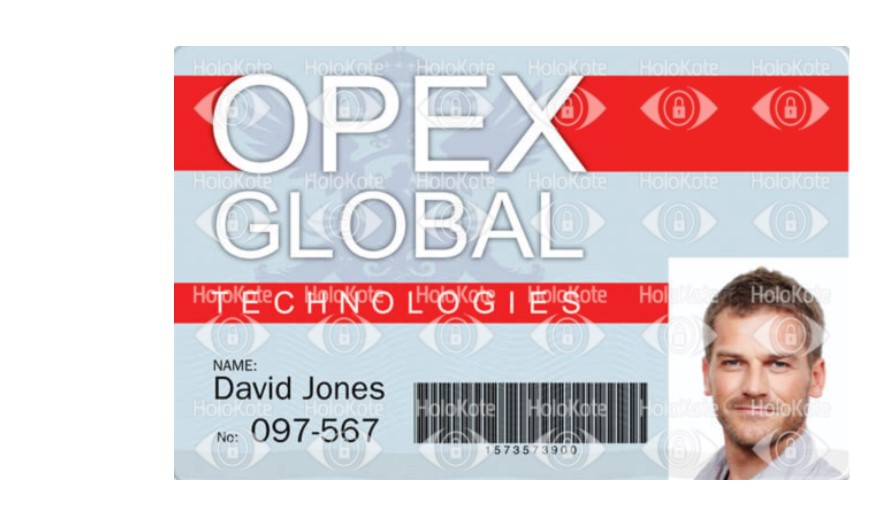
Custom Holokote
A custom Holokote is a paid feature only available in Magicard 600 and Ultima printers. This kind of Holokote eliminates the need for a holographic ribbon. Instead, the Holokote design is programmed into your printer’s firmware making it exclusive to your printer alone.
You can get a bespoke Holokote design of your company logo or any other logo you want. You decide whether you like it printed all across or just on one spot of the card. Having a custom Holokote adds extra security to your card since a design is exclusive only to your printer’s serial number.
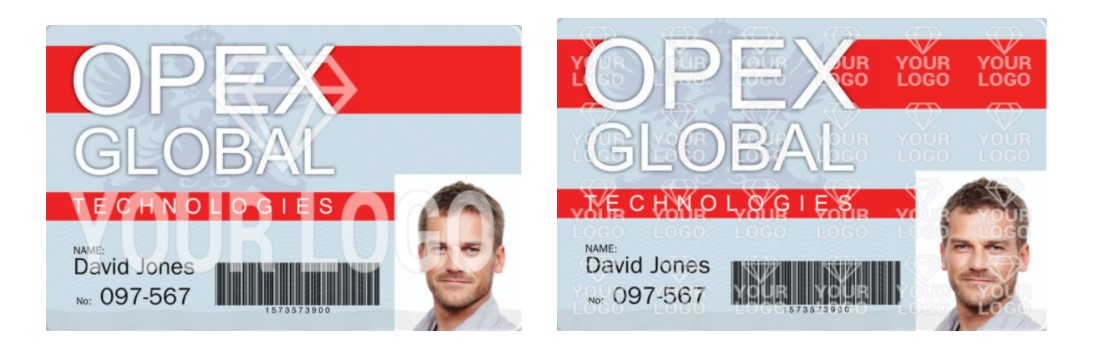
Custom Holokote Design Specifications
Canvas Size
The canvas size for Custom HoloKote for Magicard 600 and Ultima in portrait and landscape is 1014 x 642 pixels.
Pixel Width
When designing your artwork, it is essential to check that any components have a width greater than 1 pixel. Any design elements such as lines or fonts at 1-pixel width or less may print partially broken or fail to print at all. A 2-pixel line or type width is the suggested minimum thickness for HoloKote output quality.
Gradients
It isn’t possible to print a HoloKote design with a gradient or shadow as part of the artwork, any designs submitted with these features will be rejected. For best results, use solid black and white.
Colored Designs
Any colour or greyscale image submitted using the online tool will automatically be converted into a black and white image. This process means that we cannot always guarantee the desired output required. To ensure optimum HoloKote output, the submitted artwork should be solid black and white only and preferably on a white background.
Holokote Print Area Coverage
A HoloKote design should not cover more than 45% of the card area. Areas of more than 45% may cause print quality issues.
Cards with Feature Areas
When using cards with features such as chips or holograms, make sure the HoloKote design does not cover them.
Design Uniqueness, Trademarks, and Copyright
Make sure you have the right to use the image or logo you submit. If you submit logos from trademarked or copyrighted brands, your order will be rejected.
How to Get a Custom Holokote
Getting a custom Holokote means you already have a company logo, or you are done creating a Holokote design. You are ready to have Magicard transform it into a holographic watermark for you. It is crucial to make sure you follow the design guidelines set by Magicard to ensure your order doesn’t get rejected. When you’re ready to place the order, you can order here.
Every Bodno printer ships as a kit with Bodno ID Card Software, a ribbon and blank cards.

